What PressLoom does
PressLoom researches keywords for your business, writes long SEO articles about them, and puts them on your website.
You tell PressLoom about your business once. It looks at your website, your competitors and the customers you want, and it builds a list of search terms worth writing about. Those terms land on a calendar, one per day. Each one turns into a full article you can read, edit, download or publish straight to your site.
You don't need to know anything about SEO to use it. You do need a website you can connect, and you need to read what it writes before it goes out.
The whole product on one screen
The Content Planner is where most of the work happens. Every day in the month holds one keyword card. A green check means the article is written. A blue clock means it's still scheduled. Click a card to see the keyword, or to generate the article now.
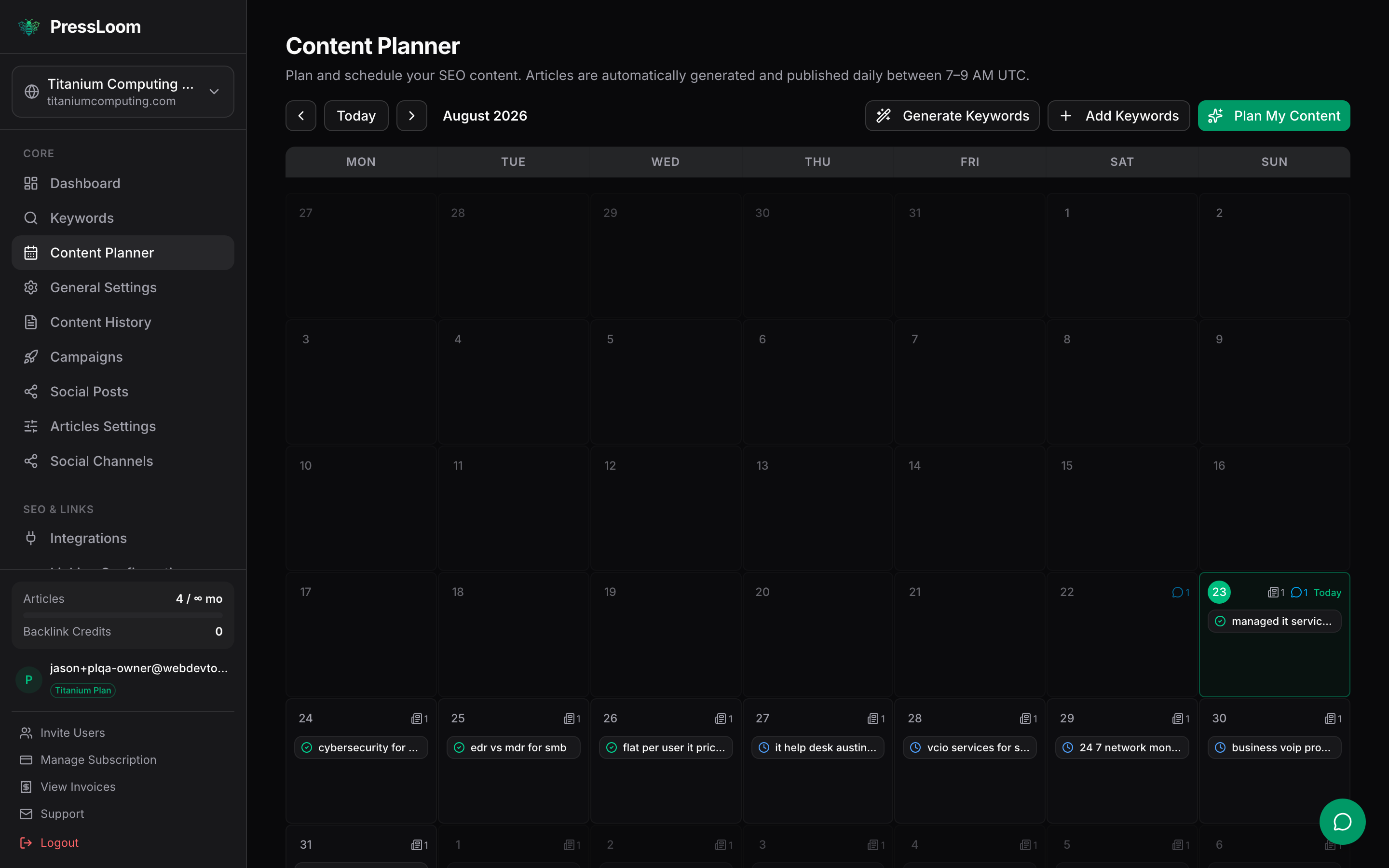
PressLoom can generate and publish an article a day on its own, but that runs once background processing is enabled for your account. Until it is, you generate each article yourself from the planner or the keyword list. Everything else on this page works either way.
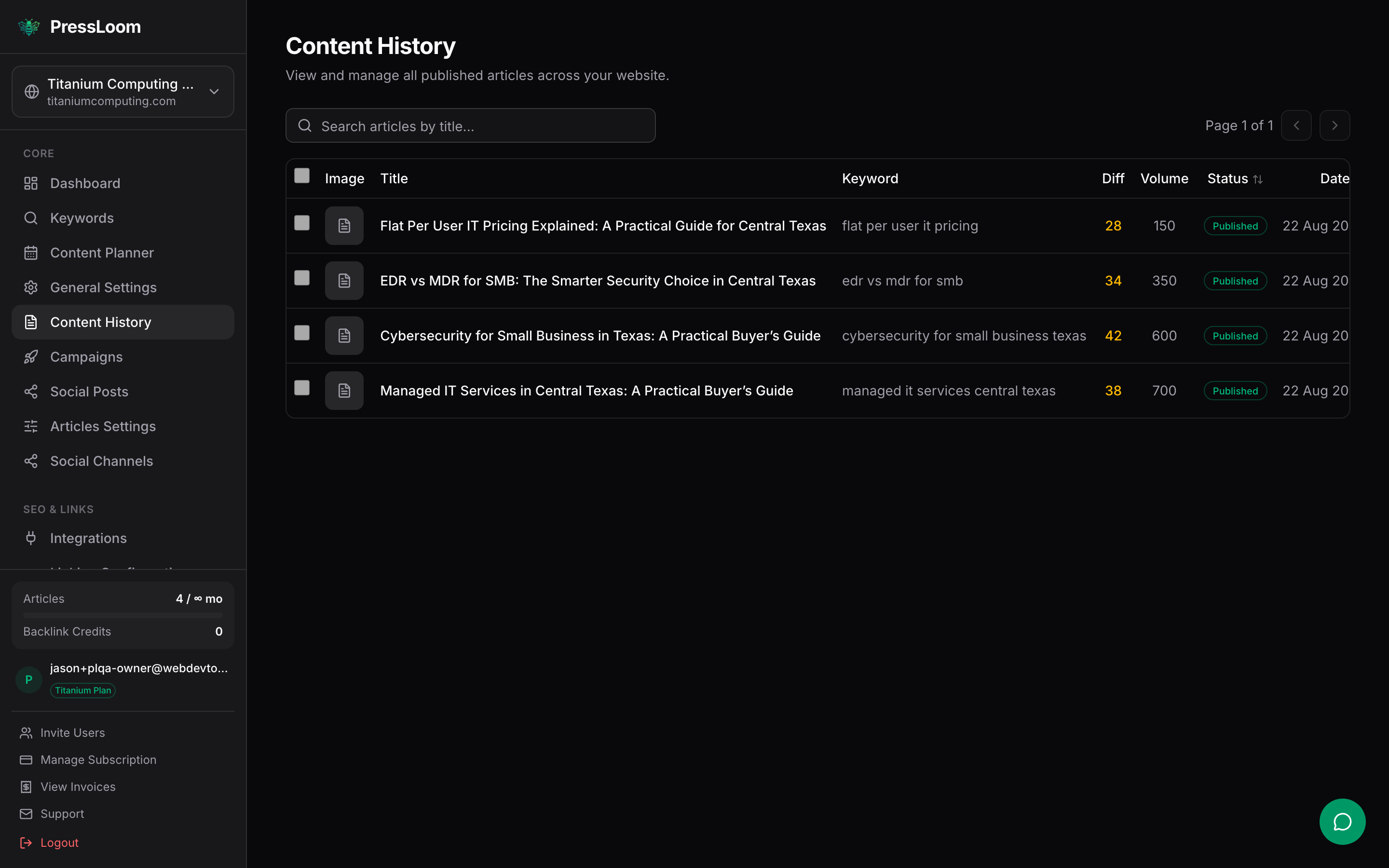
Once an article exists it shows up in Content History with its keyword, its search volume, its difficulty and its status.
Who it's for
PressLoom suits a business that sells a service and knows it should be publishing, but never gets to it. A managed services provider, a bookkeeper, a landscaper, a law firm, a clinic. You have a website with a blog on it that hasn't been touched in a year, and you'd rather it filled up with pages that answer the questions your customers actually search for.
You can run more than one website from the same account. Each one keeps its own business profile, its own keywords and its own articles, and you switch between them at the top of the sidebar. That's the usual setup for an agency or an MSP looking after a few client sites.
Five things it's good at
1. A steady stream of SEO articles for a service business
This is the main job. You describe what you do and who you sell to, and PressLoom keeps producing long articles aimed at the searches your buyers make. Articles run long, usually a few thousand words, with a proper heading structure, a key takeaway box and a meta description already written.
2. A content calendar driven by real keywords
You're not staring at a blank page wondering what to write. PressLoom researches keywords off your site, your competitors and your target audiences, scores them by volume and difficulty, and spreads them across the calendar. You can add your own keywords, drag a card to a different day, or delete the ones that don't fit your business.
3. Drafting long pages you finish by hand
Plenty of people use PressLoom as a first-draft machine and never let it publish anything. Generate the article, open the built-in editor, cut what's wrong, add the detail only you know, then download it as Markdown or HTML and paste it wherever you want. Nothing leaves PressLoom until you send it.
4. Feeding a WordPress blog
If your site runs WordPress, you install the PressLoom Connector plugin and paste in an integration key. After that, publishing an article from PressLoom creates the post on your site with the title, the body, the slug and the SEO fields filled in. See Connect your site.
5. Feeding a static git site
If your site is built from a repository, an Astro or Hugo or Jekyll site for example, PressLoom commits the article to your repo as a Markdown file with front matter. Your normal build picks it up and deploys it. Same page covers the setup.
What it isn't
It isn't a social scheduler. PressLoom writes pages for your website. It isn't the tool for planning posts across social accounts.
It isn't a website builder. It doesn't host anything and it won't design or restructure your site. You keep the site you have. PressLoom adds articles to it.
It isn't a substitute for reading what it wrote. The articles are generated. They're good starting points and they're often ready to go, but you own what appears under your name. Read before you publish, especially anything with prices, claims or dates in it.
Where to go next
- Getting started for signing in, onboarding your website, and getting your first article written.
- Articles for generating, editing, downloading and publishing.
- Connect your site for WordPress and static git sites.